


When I started looking for ways to study more efficiently, I never imagined that I would find so many apps for studying that would actually make a difference. At first I was skeptical. I thought no app was going to replace my physical notes or highlighters. But as time went by and the academic load got heavier and heavier, I realized that using technology well can make the difference between passing or excelling.
The most interesting thing is that you don’t need to be an expert in apps or productivity. You just need to find the right tools and know how to adapt them to your way of studying. In this article I want to share with you my personal experience with the 15 study apps that have helped me the most during the last semesters. All of them are free (or have a free version), easy to use and 100% tested by me.
Table of contents
Apps to organize your homework and study time
1. Google Calendar
Before I got to know Google Calendar well, I used to leave tasks to the last minute or forget important dates. Everything was scattered: I used cell phone reminders, notes on paper, sometimes screenshots of teachers’ notices. Total chaos.
With Google Calendar I found a visual and very practical way to organize myself. What I do is block out specific times to study each subject, as if they were official classes. I even schedule breaks or time to review before exams. The key, for me, was to establish it as a daily routine: every Sunday I review what I have pending for the week and distribute it on the calendar.
In addition, I like that I can set different colors for each type of activity. For example, exams in red, deliveries in yellow, free time in green. That simple personalization helps me to have mental clarity and stay motivated.
2. Google Tasks
Although it looks like a simple app, Google Tasks is a gem for those of us who like to cross things off the list. I use it in combination with Google Calendar. When I schedule a study block, I also create one or more specific tasks within that block. For example: “Read chapter 4 of the History book” or “Summarize topic 3”.
It has helped me a lot to be more specific and to divide big tasks into small actions. This technique reduces my anxiety because I no longer see a “mountain” to do, but small steps that I can climb one by one.
In addition, since it synchronizes with Gmail and the calendar, I have everything in a single ecosystem. Sometimes I even dictate my tasks using the microphone, and in seconds it’s scheduled.
3. Notion
I confess that at first I was a bit overwhelmed with Notion, because it has a lot of features and seemed more complicated than I needed. But once I learned the basics (and watched some tutorials on YouTube), it became one of my favorite study apps.
With Notion I have my own academic management system:
- A section for notes by subject
- A “kanban” type table to keep track of projects
- Weekly task lists
- Databases with useful resources, such as links, PDFs, books, etc.
I like that I can customize everything with icons, colors and templates. I feel that studying with Notion is more visual, cleaner and more motivating. I have even created templates for friends who also wanted to be better organized.
Apps for efficient digital note-taking
4. Microsoft OneNote
OneNote was the first app that made me say: “ok, digital notes make sense”. I discovered it in a class where the professor was talking so fast that I couldn’t keep up with him writing by hand. What I did was to open OneNote, turn on audio recording and start taking notes at the same time.
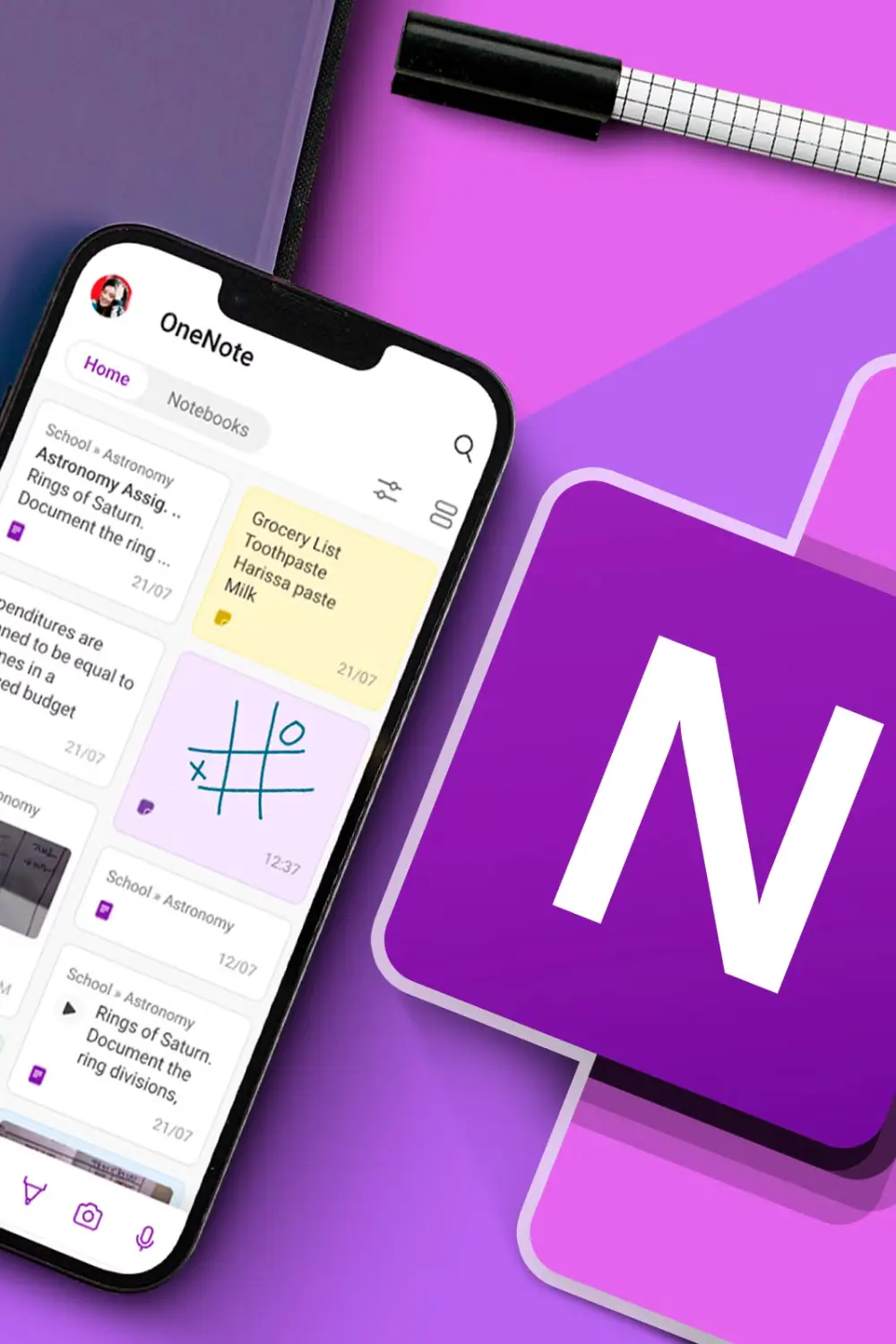
I love that I can divide my notebooks by subject, and within each subject have sections such as “summaries”, “class notes”, “essay ideas”, etc. Plus, I can insert images, screenshots, or even handwrite if I’m using a tablet.
One function I use a lot is the search function. I type in a keyword and it takes me straight to that note, without having to go page by page like with a physical notebook.
5. Evernote
Evernote was one of my first applications to study, before I knew Notion or OneNote. Although I use it less now, it is still useful for its simplicity. I use it mostly to capture quick ideas, important phrases that I find while reading, or to save links that I later want to review.
The good thing about Evernote is that everything is synchronized in the cloud, so if I write something down from my cell phone, then I have it available on my computer. It is very useful when you are away from home and you need to write something down quickly without having to deal with formatting.
Apps to memorize and review faster
6. Quizlet
Quizlet was my salvation in subjects like History, Law and Biology. It helped me study laws, dates, complex terms, and the best part is that I didn’t have to do everything from scratch. The app has millions of flashcard sets created by other students, and many times I found just what I needed.
What I like the most is that it has several study modes: flashcards, quizzes, matching games, writing mode, etc. This keeps the review from getting boring. In addition, you can create your own flashcards and mark which ones you have mastered and which ones are more difficult.
I used Quizlet especially on public transportation. I would put on my headphones, open a set, and start reviewing without pressure. Even before an exam, it has saved me more than once on those last few key reviews.
7. Anki
I came across Anki just when I started to take my language studies more seriously and needed an efficient way to retain vocabulary without feeling like I was forgetting it every week. Unlike other more visual or gamified apps like Quizlet, Anki has a more technical and minimalistic approach, but behind that simplicity hides one of the most powerful memorization tools I have used so far.
Anki works with a system called spaced repetition (SRS). This means that instead of randomly showing you the same cards over and over again, it presents them to you just when your brain is about to forget them, which according to learning studies is the optimal time to reinforce long-term memory. And yes, in my personal experience, it really works.
I started using it to learn vocabulary in advanced English, and then in French, especially when I was preparing for certification exams. I realized that I could study 10 or 15 minutes a day and still see results. I learned to use it with flashcards that I created myself, with definitions, examples of usage, synonyms and even audios that I recorded myself or found online. That process of creating the flashcards is also part of the learning process, because it forces me to think, synthesize and organize the information.
Later on, I also started using Anki for other subjects where memorization was key. For example:
- In History, to memorize dates, names of characters, treaties, important events.
- In Law, to learn articles of law, legal concepts and normative hierarchies.
- In Biology, for classifications of organisms, physiological processes, scientific names.
What I liked most about Anki was its total flexibility. You can customize everything: the review intervals, the design of the flashcards, add images, colors, sounds… you can even use add-ons that allow you to adapt the app to your study style. I, for example, used an add-on to automatically insert pronunciation in language flashcards, and another one that showed me detailed statistics of my progress.
I must say that at first it may seem a bit complex, especially if you are not familiar with this kind of systems. It is not an app that you open and use immediately as if it were a game. It takes a bit of time to set it up and understand how to get the most out of it. But honestly, that initial effort is completely worth it. Once you master it, it becomes a powerful tool that helps you retain information for years, not just to pass an exam.
Apps to concentrate better and study without distractions
8. Forest
There was a time when it was very difficult for me to concentrate, especially when I had to read long texts or write essays. I would always find an excuse to check my cell phone: a message, a notification, or just out of habit. That’s when I discovered Forest, and honestly, it became one of my favorite apps to keep me focused.
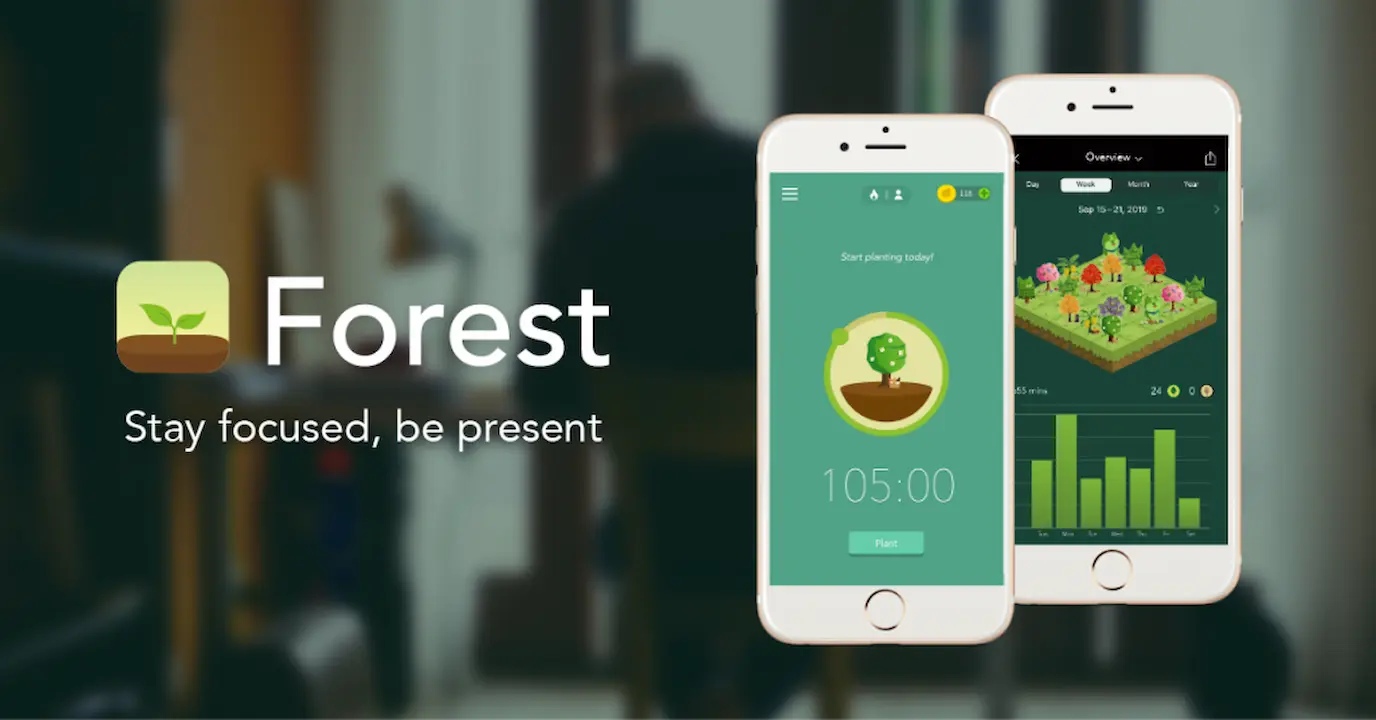
The concept is super simple, but very effective: you plant a virtual seed at the beginning of a study session, and that seed grows into a tree… but only if you don’t leave the app. If you give up before the time is up, the tree dies. It sounds basic, but watching your own forest grow with each successful session motivated me more than I imagined.
I used it mostly when I knew I was going to study for 30 or 45 minute blocks, and I needed zero distractions. I would apply it for times when it required a lot of concentration, such as when I had to read entire chapters for exams or sit for several hours writing papers. Knowing that there was a visual consequence for distracting myself (seeing the dry tree) and a tangible reward (my forest growing) made me put the cell phone aside without remorse.
Another detail I liked is that you can see your daily or weekly progress, and that helped me realize if I was really keeping up with my study times. I even challenged myself to plant more trees than the day before.
In short, Forest was my ally in overcoming cell phone temptation when I needed it most. It doesn’t block apps or mess with your system, but it makes you think twice before logging out. And for me, that was just what I needed to study better.
9. Focus To-Do
It combines Pomodoro timer with to-do list, and that for me was a perfect combo. I would put in 25 minute blocks of study followed by 5 minute breaks, and after every 4 cycles, I would take a long break. This helped me avoid mental exhaustion and keep a steady pace without getting saturated.
I also like that you can organize your sessions by projects or subjects. For me, it helped me to visualize how much time I was actually spending on each subject, and adjust if I saw that something was falling behind.
Applications to solve difficult exercises
10. Photomath
Without a doubt, Photomath has been one of my favorite tools when I was stuck with a math problem. I remember those times when I didn’t even know where to start with an algebra or calculus exercise, and this app was the first thing I opened on my phone. What I like most is that it’s not just a simple problem solver: you take a picture of the problem with the camera and, in seconds, it shows you not only the final answer, but also the whole step-by-step process to get to that solution.
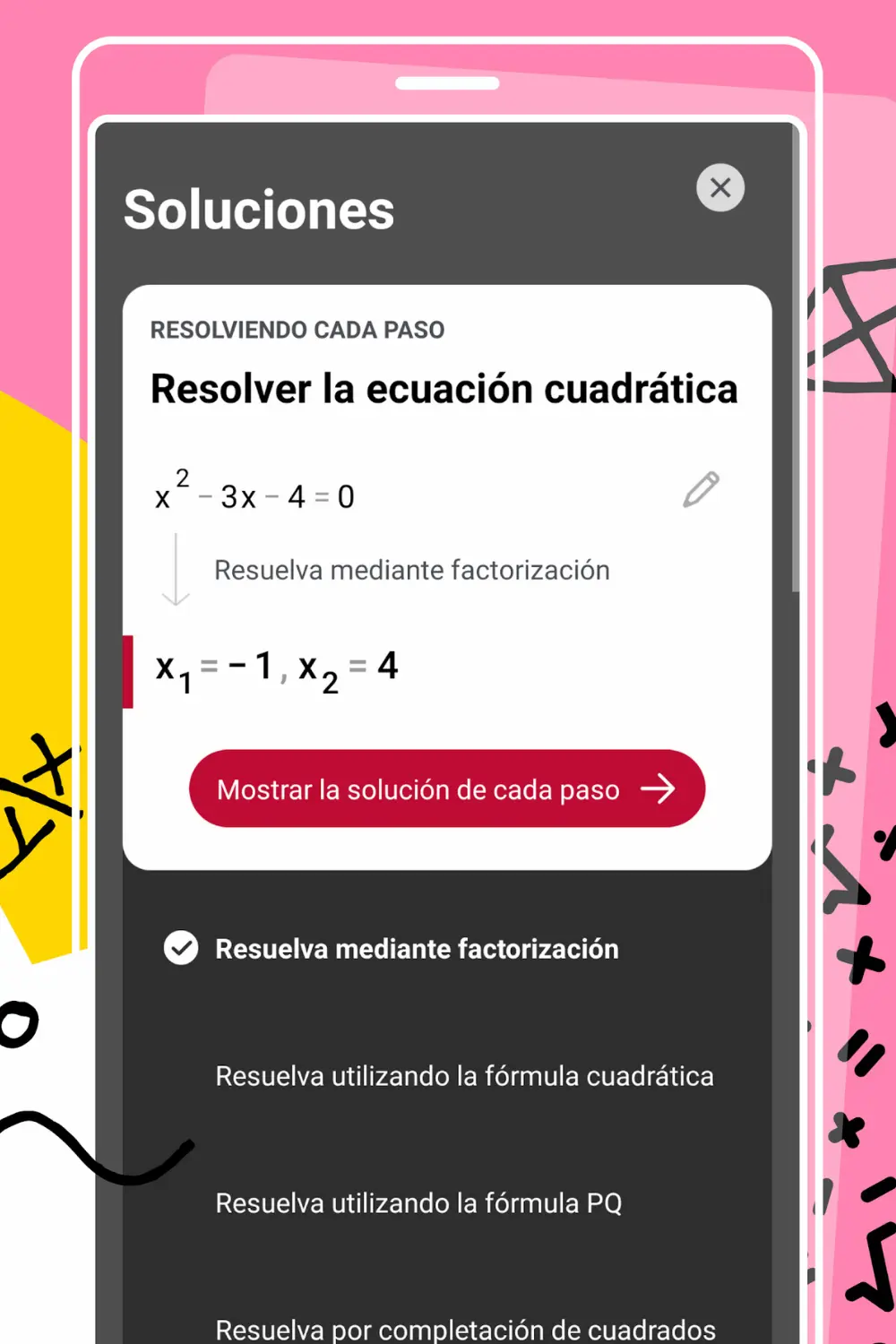
What really saved me in many subjects was that Photomath helped me to understand the method and not just copy the result. In complex subjects such as algebra, calculus, and even statistics, this app was my perfect ally to understand where I was making mistakes and how to correct them. I didn’t use it to cheat or to pass a test quickly; on the contrary, I used it to really learn. For example, after solving a problem with Photomath, I would combine it with my notes to reinforce the topics and make sure I really understood the logic behind each step.
Also, what I like is that it is very intuitive and easy to use, something that helped me not to get frustrated when I had doubts and needed immediate help. It also allowed me to practice and prepare better before exams, because I could review similar exercises and understand the solutions in detail. Without a doubt, Photomath became an indispensable resource in my study routine, and I highly recommend that anyone who struggles with math should give it a try, not to copy, but to really understand and improve.
11. Wolfram Alpha
This app is more advanced than Photomath and worked very well for me when I came to subjects like Physics or Financial Mathematics. You can write equations, derivatives, integrals or complex problems, and it gives you a detailed solution with technical explanations.
It is ideal if you are in college or in more technical areas. I even used it to check if my results were correct after solving by hand.
All-in-one applications and general support
12. GoodNotes (iOS)
On my iPad, GoodNotes has become the main app for taking handwritten notes, and honestly, I don’t know how I studied without it. What I like most is that I can use my stylus as if I were writing on paper, but with all the advantages of the digital world. Here are some of the reasons why GoodNotes is my favorite tool for studying:
- Natural and fluid writing: The feel of writing with the stylus is so similar to writing on paper that the transition was super easy for me.
- Digitizing and searching: All my notes are digitized, and the best part is that I can search for words within them, which saves me a lot of time when I need to find something quickly.
- Subject organization: I can sort my notes into folders and sections, which makes everything super organized and accessible.
- PDF import: A feature I use a lot is being able to import PDFs and write directly over them, perfect for annotating documents or digital books.
- Outlining and underlining tools: I can easily create outlines and underline with different colors, which helps me to highlight the most important and visualize the information better.
- Cloud synchronization: All my information is automatically synchronized, so I can access my notes from different devices without losing anything.
GoodNotes was especially useful to me in classes where professors talked fast or showed a lot of graphs and diagrams. It helped me to keep everything clear, orderly and very well documented, which certainly improved my understanding and preparation for exams.
13. Grammarly
Although it is an app best known for proofreading English, Grammarly helped me a lot in academic writing. I use it when I have to send formal emails, essays or assignments in English, and it gives me suggestions for grammar, style, tone and clarity.
Once, thanks to Grammarly, I avoided sending a cover letter with several errors I hadn’t noticed, and it gave me more confidence to apply for a scholarship.
14. Canva
Although Canva is a design tool, for me it is one of the indispensable applications for studying and organizing my work. It has bailed me out on more than one occasion when I needed to create presentations, mind maps, infographics or cover pages for papers that really stood out.
These are the reasons why Canva has earned a special place on my list of study apps:
- Easy-to-use, professional templates: Canva offers a wide variety of ready-to-edit templates, allowing me to create professional-looking designs in minutes, without being a designer.
- Versatility for different formats: Whether it’s a presentation for class, a mind map to organize ideas, or an eye-catching cover page for a paper, Canva has options for everything.
- Intuitive editing: The interface is super user-friendly, making it easy to add images, text, icons and customize colors or fonts without hassle.
- Time saving: When I don’t want to spend hours designing, Canva allows me to achieve great results quickly and effortlessly.
- Accessibility from any device: I can use Canva on my computer, mobile or tablet, and everything syncs to continue working at any time.
For me, Canva is the best option when I want a project to look professional and attractive, without having to be an expert in graphic design. Definitely, an app that I recommend for anyone who wants to give a plus to their work and presentations.
15. ChatGPT
And finally, ChatGPT. I use it for so many things:
- Summarize long texts
- Explain complex topics to myself as if I had a personal tutor
- Generate ideas for essays or projects
- Resolve doubts in real time
What I value most is that I can converse with the AI as if I were asking an intelligent partner. It has helped me review before exams, understand formulas, and even practice languages. Without a doubt, one of the best educational tools I have at hand today.

After years of trying different apps to study, I have realized that it is not about using all of them at the same time, but about knowing which one works best for each stage of the academic process. Some have helped me to get organized, others to memorize, others to stay focused, and some others to understand what I didn’t understand in class.
The important thing is to experiment and create your own system. If you use them well, these tools can multiply your productivity and make studying not only more effective, but also more bearable.
Would you like me to prepare a downloadable guide with all these apps and how to combine them to build your ideal study routine?




This has been a truly fantastic post, packed with valuable insights and practical advice. I’m grateful for the effort you put into creating such a comprehensive and helpful resource.
Thank you so much! Your words truly mean a lot. I’m so glad the post was helpful for you. If you ever have questions or suggestions, feel free to reach out! 😊